Run Claude Code on a Cheaper Model Without Losing Your Phone Remote

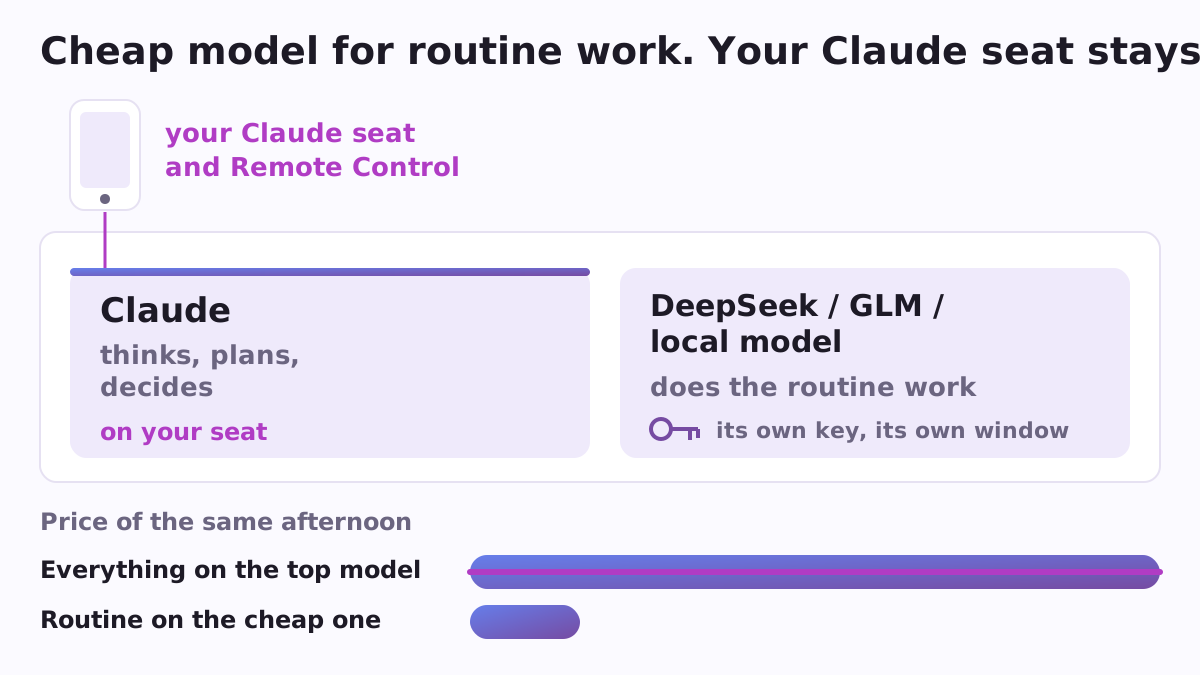
Many people who use Claude Code, Anthropic's AI assistant that works with the files on your computer, run into the same arithmetic. The strongest model is very good at thinking, and you pay for that every time it also does the boring work: renaming files, drafting the tenth similar letter, reading a long folder. Cheaper models from DeepSeek, Z.ai (GLM), Moonshot (Kimi), Alibaba (Qwen), MiniMax and Xiaomi (MiMo), or a model running on your own computer, can do much of that work for a fraction of the price. Routecall lets you use them and keep everything your Claude sign-in gives you.
Why a separate window matters
If you work on a Claude seat (Pro, Max, Team or Enterprise), that sign-in is what gives you Remote Control: you start a task on the computer and follow it from your phone. The usual way to bring in another vendor's model is to point Claude Code at that vendor's address with the ANTHROPIC_BASE_URL setting. Claude Code's own documentation says Remote Control is not available when that setting points anywhere other than Anthropic, and the advisor tool, where a stronger Claude model guides a cheaper one, needs Anthropic's own service too. Routecall is built so that you get the cheap model and keep both.
What Routecall does
Routecall is a free, open-source plugin for Claude Code. Its one rule: it never moves your main Claude Code. Your normal window stays on your seat. A cheap model gets its own separate window for each project, and scripts get a gateway. The plugin never writes to your main ~/.claude/settings.json.
- Cheaper on the seat itself (
advisor). It sets up the advisor tool (Sonnet does the work, Opus advises at the decision points), oropusplan(Opus plans, Sonnet carries it out), or helpers that run on Haiku. This is the place to start. - A second window on a cheaper vendor (
profile glm,kimi,deepseek,qwen,minimaxormimo). It writes a settings file inside the project and a launcher. The launcher takes the key from your system keychain each time it opens. When the window starts, a banner says plainly what that window can and cannot do. - Your key stays out of the chat (
key). It gives you the one line to type in a terminal that puts the key (the vendor's password-like code, an API key) into macOS Keychain, libsecret on Linux or the Windows credential store, so the key never passes through Claude. - A window on your own computer (
profile local). The window talks to a model running in Ollama, LM Studio, llama.cpp or llama-swap.localsuggests which model to run for your machine's memory, andlocal loadmeasures a running server: tokens a second, and how many people at once it can serve. - For scripts and teams (
gateway,crew,server). It compares eight gateways, among them LiteLLM and claude-code-router, writes a LiteLLM setup for scripts with a daily budget, and prepares a llama-swap server for a company machine. - Why is the remote gone? (
doctor). It says which address Claude Code is talking to, who set it, and whether Remote Control and the advisor work in this setup, and if not, why.
A concrete example
You run a small office and use Claude Code on a Team seat. On Monday you want it to go through three hundred supplier invoices saved in a folder and sort them. That is routine work. You ask Routecall for a DeepSeek window in that project, type the key once with the keychain line it gives you, and open the new window with the launcher. The sorting runs there at DeepSeek's price. Your normal window stays on your seat, so in the afternoon, when you leave for a meeting, you can still follow your main project from the phone.
For companies
Routecall is one of the company plugins of Poly A1. It reads a shared policy file, where an administrator can list allowed and denied vendors, folders that must stay on the company's own machine, and a daily budget for the gateway. It routes and measures; prices come from the dated price table of its sibling Billcall, and the policy file is written by Firmcall and shared with Gatecall.
How to start
You need Claude Code and Python 3.8 or newer; the plugin uses only Python's standard library. Install it from the Poly A1 plugins catalogue:
/plugin marketplace add https://raw.githubusercontent.com/vadimchernets/poly-a1-plugins/main/.claude-plugin/marketplace.json
/plugin install routecall@poly-a1
Then ask in plain words, for example "make me a cheap DeepSeek window for this project", or type /routecall:routecall advisor to begin with the cheapest change on your own seat. Routecall is open source under the Apache-2.0 licence. The code, tests and full instructions are at github.com/vadimchernets/routecall.
Vadym Chernets also builds Poly A1, an app in which AIs from different companies check each other's work.