Run Claude Code Overnight and Wake Up to a Report

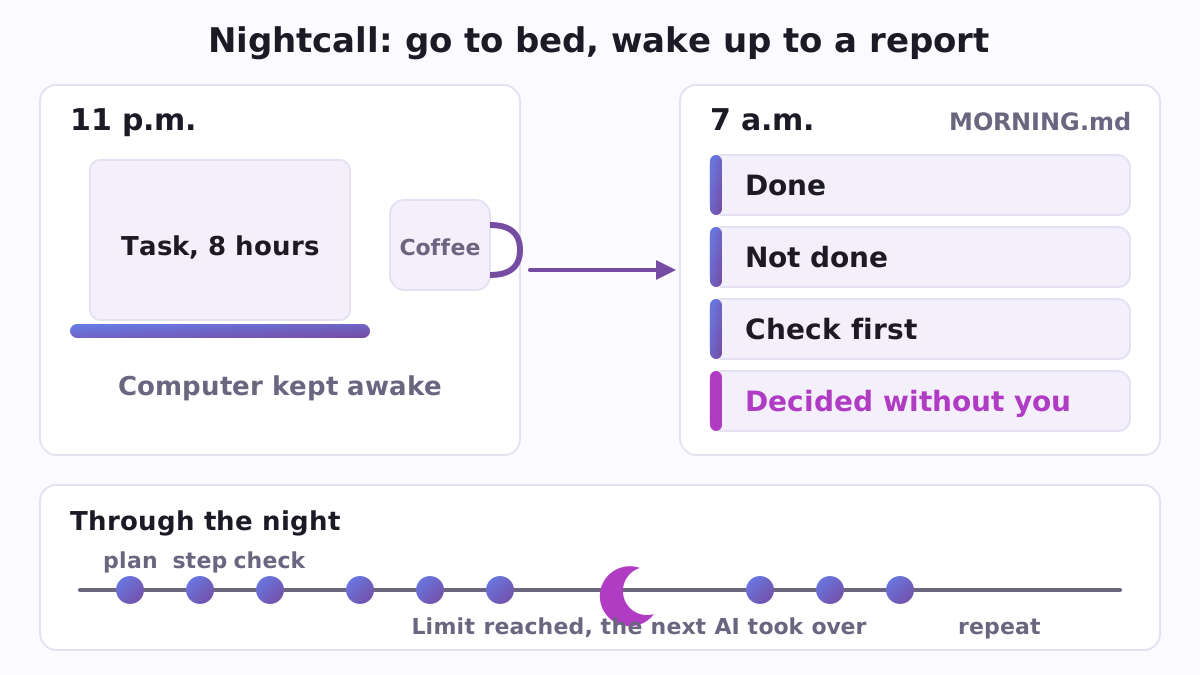
You have a big job and not enough evenings. Sort three years of notes into a book outline. Go through two hundred customer emails and draft the replies. Clean up a messy website. Claude Code can do this kind of work, but it needs hours, and hours at a desk are the one thing you do not have. So you would like to say "do this" at ten in the evening, go to bed, and read the result at breakfast. Nightcall is a free, open-source plugin for Claude Code, Anthropic's AI assistant that works with the files on your computer. It sets up exactly that: a night shift with a morning report.
Why leaving it running usually fails
The idea is simple, but a night alone is hard on a computer and on an AI. The laptop goes to sleep and the work stops. The usage limit of your subscription runs out at 3 a.m. and the session sits there, or ends. The AI stalls on step four and spends six hours politely stuck. Or it keeps going and does something you never asked for in a folder you did not mean it to touch. In the morning you find a half-done mess and no idea what happened. People look for ways around each of these separately: how to keep a Mac awake, how to continue after a limit, how to run Claude Code overnight at all. Nightcall puts the answers in one place.
What it does
You write one line in Claude Code, for example:
/nightcall:start Go through all my notes in the "Ideas" folder, build a 12-chapter book outline from them, and draft the first chapter. 8 hours.
Then Nightcall spends about five minutes with you before you leave and takes care of the rest.
- A plan and a safety net. Claude writes a plan first. Before the night begins Nightcall makes a restore point of your task folder, so you can go back to how things were, and writes a rule into the folder that the work stays inside it.
- Coffee for the computer. A small program keeps the computer awake for the number of hours you choose, on a Mac, Linux or Windows, without administrator rights, and switches itself off at the end. It also gives you a short checklist of the three things only you can do: leave the lid open, plug in the charger, pause system updates.
- Work in steps, with checks. Claude works one step at a time, checks each step, criticises its own work, and writes what it did into a progress file. A step that fails three times is marked and skipped, so one problem cannot eat the whole night.
- A second head from other AIs. Before you leave, Nightcall tests which other AIs you already have, such as Codex, Gemini or Grok, and says which ones are alive tonight. During the night Claude can ask them for a second opinion, and a dead one is replaced by the next.
- When a limit runs out, the work goes on. If you have your own Codex or Gemini subscription, the next step can continue there from the same plan and progress files when the Claude limit runs out, and the work returns to Claude when its limit is back. Families can do the same relay, each person using only their own account, signed in by themselves and with their own consent.
- A sturdier mode. A loop option starts a fresh Claude for every step, so a closed window or a limit at 3 a.m. does not end the night. It stops by itself at the end time, or when you put a file named STOP in the folder.
- Nothing lost on the way. An optional checklist keeps your own words, one item per line, and an item only counts as closed when something real exists behind it: a commit, a file, a test that ran.
- The morning report. When you come back,
MORNING.mdbegins with the decisions that were left for you. Then it lists what is done, what is not done, what to check first, and which AIs really took part.
Things that cannot be undone are never decided at night: sending, publishing, paying, deleting with no way back, signing in with a password.
A concrete example
Marta is a writer with a folder of 300 loose notes. At 10:30 p.m. she types the line above, answers a few questions, checks the lid, charger and updates, and goes to sleep. In the night Claude reads the notes, writes the plan, groups the notes into themes, builds the outline and drafts chapter one. Around 2 a.m. her Claude limit runs out and her own Codex takes the next steps from the same files. At 7 a.m. she opens MORNING.md: the outline is done, chapter one is drafted, one folder of unreadable scans was marked and skipped after three failed tries, and two choices about the book's order are waiting for her, each with the way to undo it.
How to start
You need Claude Code. In it, add the catalogue and install the plugin:
/plugin marketplace add https://raw.githubusercontent.com/vadimchernets/poly-a1-plugins/main/.claude-plugin/marketplace.json
/plugin install nightcall@poly-a1
Then run /nightcall:ready for the checklist before leaving, and /nightcall:start with your task and the number of hours. In the morning, /nightcall:morning writes the report and switches everything off. The "coffee for the computer" also works on its own, without Claude: bash scripts/awake.sh 8 on a Mac or Linux. Nightcall needs no paid service and buys nothing; it speaks English, Spanish, Portuguese, Russian and Ukrainian. If you also install its sibling plugin Pocketcall, the night appears as one line on your phone ("Working, round 7", "Resting on a limit until 03:10", "Done") and the phone rings when the night rests on a limit or ends.
Before the night, Safecall can add a copy of anything Claude is about to change, and both are part of the Poly A1 plugins catalogue.
The code is open under the Apache-2.0 licence: https://github.com/vadimchernets/nightcall.
Vadym Chernets also builds Poly A1, an app in which AIs from different companies check each other's work.